How We Migrated 300+ Databases from On-Prem SQL Server to Azure SQL Managed Instance

Over 300 SQL Server databases. Each with its own SSIS package — some running PowerShell, some wrapping VBScript, some calling .NET apps on local Windows servers. A financial data platform that had grown for years, serving data to consumers who needed it to be right, every day, on time. By the time we got involved, the platform was carrying years of accumulated technical debt. It had grown faster than anyone could refactor it, and there was more to fix than there was to build. On paper this was a SQL Server to Azure SQL migration. In practice, it became a full rebuild.
What started as a move to Azure SQL Managed Instance — 300+ databases lifted off on-prem hardware — turned into a full re-architecture across three layers: scraper, pipeline, and database. Critical incidents dropped by 70–85%. End-to-end latency went from up to half an hour to under five minutes. And 300+ unique SSIS packages became one ADF pipeline. The problem was never where the system ran. It was how it was built.
This article is about how we got there — what we delivered, what broke, and what we learned.
Table of Contents
The System We Inherited
Three years ago, I joined a data engineering project where the primary technical goal was a large-scale cloud migration. The system was a financial data platform that scraped data from hundreds of external sources (FTP feeds, APIs, proprietary formats). After ETL processing, that data was served to downstream systems analysts used daily. The migration direction and high-level architecture came from the client’s side. Our job was to execute it, and over time, to shape how it got done.
Initial implementation efforts eventually expanded in scope and complexity. The deeper we got into the system, the more decisions fell to us. How to structure the database templates? How to handle parallelism? How to manage CI/CD for 300+ database repositories? How to untangle years of undocumented logic? By the time the core migration was done, I was leading the infrastructure.
The platform had grown organically over many years since the initial database setup into something sprawling and fragile. Reliability was not optional, but the infrastructure made reliability hard to guarantee.
There were over 300 on-prem SQL Server databases, each usually representing multiple data sources. Every single one had its own SSIS package for data ingestion. Some of those packages were using PowerShell scripts, some had VBScripts, some were wrapping .NET applications that ran locally on Windows servers. There was no standard. If you wanted to understand how a given database worked, you opened its SSIS package and started reading — and hoped the logic was still accurate.
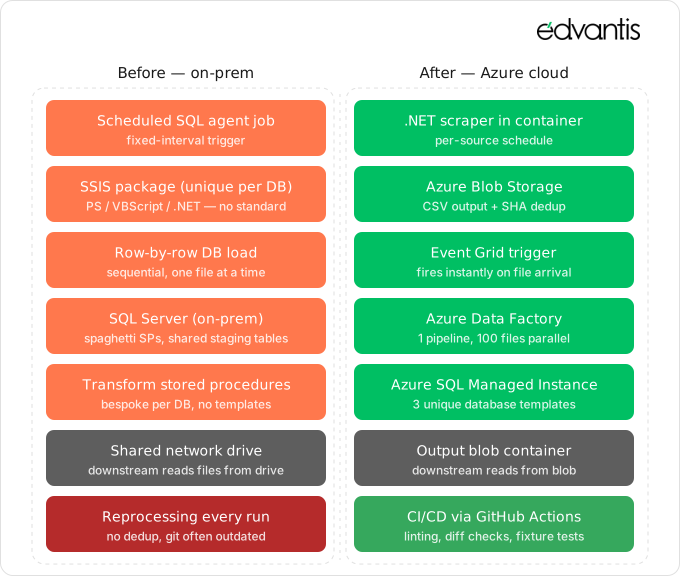
The extraction flow looked like this: SQL Agent jobs triggered SSIS, which fetched data from an external source, loaded it row by row into a SQL Server database, called stored procedures to transform it, then called another stored procedure to produce a standardised output, which was written to a shared network drive. Downstream services picked files off that drive.
There was a GitHub repository for each database’s code, but it was routinely out of date. Developers would make changes directly in production or development environments and commit to Git when they remembered, which was not always. In practice, the repository was documentation at best, not a source of truth.
The most dangerous discovery came partway through the project: we identified some SSIS jobs running on schedules that nobody on the current team had set up or documented. They were pulling data from sources that weren’t registered anywhere. We only found them when something stopped arriving in downstream reports. Some of these jobs had been running untouched for years.
The ingestion logic compounded all of this. The system pulled data by fetching the last day’s worth of files from source feed on every scheduled run, then loaded them one at a time into the database in a loop. The same files were frequently reprocessed across multiple runs. At scale, this was slow, wasteful, and entirely invisible to the team, since there was no mechanism to know whether a file had already been loaded.
Why We Chose to Re-Architect, Not Migrate
The instinct in projects like this is often to lift and shift: take what exists, move it to the cloud, deal with the rest later. We ruled that out early.
An Azure SQL Managed Instance migration done as lift-and-shift would have moved the problem, not solved it. The core problem was not where the system ran. It was how it was built. Moving so many inconsistent SSIS packages to Azure Data Factory would have given us cloud infrastructure wrapped around on-prem logic with all the same fragility, just hosted differently. The shared network drive pattern, the single-file-at-a-time ingestion, the undocumented stored procedures… None of that would improve by changing the hosting environment.
A three-layer re-architecture was defined:
- Replace SSIS with a single ADF pipeline framework — instead of one SSIS package per database, we would build one main Azure Data Factory pipeline capable of serving all 300+ databases, plus a small number of supporting pipelines for maintenance and metadata operations. This SSIS to Azure Data Factory migration collapsed 300+ packages into one.
- Rebuild the database layer from templates — we designed three database templates (each different enough to warrant its own model) covering standard tables, models, and stored procedures for each data flow. Every database migration would be a rewrite against one of these templates, not a copy of whatever had existed before.
The migration was manual. With 300+ databases, each requiring schema redesign, stored procedure rewriting, and data migration, there was no shortcut. What we could do was automate everything repeatable. We built scripting that handled the parts that followed a pattern, which meant the manual work was genuinely the work that required judgment.
Building the Three Layers
Here is how the SQL Server to Azure SQL migration came together, layer by layer.
The Scraper Layer
The new scraper runs as a .NET service deployed in a container orchestration platform, with source-specific schedules configured per data source. The key design decision was to treat blob storage as the canonical input layer rather than the database. Every scrape writes a CSV file to Azure Blob Storage. Before writing, the scraper computes a SHA hash of the file content. If an identical hash already exists in the registry, the file is skipped. This eliminated reprocessing entirely — one large structural inefficiency that had existed since the beginning of the system.
The output format is standardised: every CSV maps to default model columns, with optional extended fields for source-specific attributes. This meant the downstream pipeline could be genuinely generic.
The ADF Pipeline Layer
When a file lands in blob storage, an Azure Event Grid trigger fires and hands it to Azure Data Factory. The main pipeline handles the full processing flow: load the CSV into the database, execute the relevant stored procedures, and write the output to a separate output blob container where downstream services read it.
Before this, each SSIS package had its own logic for how it connected to its source, how it loaded data, and how it handled errors. Now there is one pipeline. Every database uses it. This reduced the operational surface area dramatically. When something needs to change in how data flows through the system, there is one place to change it.
One of the most significant performance gains came from parallelism. The old system processed files sequentially, one at a time, in a loop. The new system processes up to 100 files simultaneously per database. The limit varies by database complexity and the size of the data bucket, but the ceiling is far above what the old architecture could ever achieve.
The Database Layer
This is where most of the manual work lived, and where the database split decisions mattered most.
Each of the three templates we created defines the standard tables, the standard stored procedures for each stage of the flow (ingestion, transformation, output), and the standard metadata structure. Migrating a database meant mapping its existing schema to the appropriate template, rewriting or replacing its stored procedures, and migrating the historical data.
Some databases required splitting before migration. The original system sometimes bundled multiple independent datasets into a single database. One database might contain prices, weather data, news, all loaded and transformed through one sprawling stored procedure with conditional logic branching on dataset type. When these databases had enough difference between their datasets to justify separation — which was almost always — we split them. Each dataset became its own database on its own template. The stored procedure untangling forced us to understand the data better, and the result was cleaner, more maintainable, faster-running code.
A similar logic applied to choosing between templates. If a dataset had current and predicted data in the same source, it became two databases after the split, each using the appropriate template. Keeping it unified would have meant building special cases into the template, which defeats the purpose of having one.
What Broke Along the Way
Two things broke in ways we had not fully anticipated.
The first was cross-database queries. Many of the legacy databases had been built with queries that pulled data directly from other databases on the same SQL Server instance — a pattern that works fine on-prem but is not supported on Azure SQL Managed Instance when databases are hosted independently. Unbinding this logic was harder than it sounds and it was slowing down some migrations. The cross-DB dependencies were rarely documented, often buried deep in stored procedures, and in some cases tangled with the transformation logic in ways that made it difficult to separate cleanly. For each database we had to trace every external reference, understand why it existed, and decide whether to replicate the data locally, replace the dependency with a proper data feed, or restructure the procedure entirely. It was slow, case-by-case work, and it contributed meaningfully to why the migration stretched past a year. Untangling these cross-database dependencies was the hardest part of the whole Azure SQL Managed Instance migration.
The second was deadlocks. Processing up to 100 files simultaneously per database created deadlock conditions we hadn’t fully anticipated. The root cause was concurrent writes to shared staging tables. Multiple files were inserting simultaneously into the same staging tables, and the transformation procedures were holding full table locks during processing. The staging tables did filter by filename, but that wasn’t enough. If rows from different files were allocated to the same data page, locks still occurred at the page level regardless of which file the data belonged to. When execution times were long, the probability of two processes colliding on the same resources became high.
Before:
UPDATE S
SET    S.NormalisedPrice = S.Price * CR.ConversionFactor
FROM   dbo.Stage S
JOIN   dbo.ConversionRates CR ON CR.Symbol = S.Symbol
WHERE  S.FileName = 'dataset_2026_01_02.csv';
We resolved this through several changes. We replaced shared staging tables with temporary #Stage tables scoped to each file’s execution, which eliminated page-level locking between concurrent processes entirely. We switched to READ UNCOMMITTED isolation level where full serializable isolation wasn’t genuinely required. We audited the stored procedures most frequently appearing in deadlock traces and optimised them, primarily targeting the queries with the longest execution times, since reducing execution time directly reduces collision probability. We also added retry logic at the application level as a safety net.
After:
UPDATE S
SET    S.NormalisedPrice = S.Price * CR.ConversionFactor
FROM   #Stage S
JOIN   dbo.ConversionRates CR ON CR.Symbol = S.Symbol;
The lesson here is that parallelism exposes assumptions in procedural code that sequential execution was hiding.
Making Git the Source of Truth
Alongside the infrastructure migration, we rebuilt how database code was managed. The old model meant the repository was unreliable as a reference: developers made changes directly in environments and committed when convenient.
We moved to a model where every change to database code goes through GitHub first. Each database has its own repository. Deployments to any environment happen exclusively through GitHub Actions pipelines targeting a specific branch. Direct changes in the database are not part of the process.
We added CI/CD checks that run on every pull request: SQL linting, diff analysis between the PR branch and the current production database state (so reviewers can see exactly what will change before merging), and integration tests that run the pipeline against a development database using fixture files from real historical data. The test asserts that the output file matches the expected output. It is not unit testing in the strict sense, but it catches regressions in procedure logic reliably.
This change had effects beyond reliability. It made onboarding faster, because new team members could read the repository and understand the state of any database without needing access to the environment. It made incident investigation faster, because the commit history was now accurate. And it made the migration itself easier, because we had a reliable baseline for each database before we started rewriting it.
SQL Server to Azure SQL Migration: Results Before and After
The numbers from this SQL Server to Azure SQL migration tell the story more clearly than anything else. The most immediate gain was pipeline latency. From file arrival to data available in production now consistently takes 2–5 minutes. Before the migration, that same journey varied widely. It could be the same speed for small datasets, but anything bigger might take up to 30 minutes, and routinely much longer once you factored in the metadata rebuild. The largest boost came from metadata, which used to be regenerated by a scheduled batch job a few times a day; some databases needed an extra 40 minutes for that rebuild.
The support ticket data is the clearest operational signal we have. The highest-severity incident load — issues requiring immediate resolution — dropped 70–85%. Notably, the system has grown since the migration completed: more databases, more data sources, more downstream consumers. The lower incident rate is not the result of running less, it is the result of the infrastructure being more stable. Total support ticket volume follows the same trend. The previous baseline was around 1,000 tickets per quarter, including automated alerts. The current range is 600–800. That figure comes with important context: alerting coverage has expanded significantly since the migration, meaning the monitoring is more sensitive than before and catches more edge cases. The system is generating fewer problems, not fewer alerts.
On throughput, the system now processes up to 100 files simultaneously per database. SHA-based deduplication ensures that files already processed are skipped automatically, cutting out the redundant reprocessing that had been built into every scheduled run. Across most datasets, parallel ingestion delivered a 2–3x improvement in throughput compared to the old sequential loop. The operational surface area is harder to quantify but immediately visible to anyone who works on the system. One ADF pipeline serves all 300+ databases. One scraper library covers all data sources. Three database templates handle the full range of data types. When something needs to change or something breaks, there is a known, consistent place to look — not a unique SSIS package with logic written by someone who left the project two years ago.
Conclusions
A SQL Server to Azure SQL migration of 300+ databases over more than a year is not a project you take on lightly, and the timeline reflects what meaningful migration actually requires. Not just lift-and-shift as that would have moved the problems to a different address. Understanding every database, redesigning its structure, rewriting its code, and validating the result. That takes time, and it takes people willing to go deep rather than fast.
Looking back, the decision to re-architect across all three layers (scraper, pipeline, and database) was the right call, and the results bear that out. Critical incident load down by 70–85%. End-to-end latency measured in minutes rather than hours. A system that has grown in scope since the migration and is running more stably, not less. These are not incidental outcomes. They are what happens when the underlying structure is correct.
If you are facing a similar migration, particularly in a domain where data latency and reliability are tied directly to business outcomes, the practical advice is this: audit before you plan, and plan before you build. That said, accept that on a project of this scale, surprises are not a sign that planning failed, we just cannot take everything into account. And what I really wonder is how much time we could save now, with all the AI tools and agents able to do rewrites — but that would be another project.
Takeaways
If you are planning a similar migration, here are a few things I would carry forward from this experience, not as universal rules but as principles that cost us something to learn.
Re-architecture pays off when the problem is structural, not infrastructural. Lift-and-shift makes sense when the system is healthy and you are only changing where it runs. But when the fragility is built into the logic itself — how the code is scattered, duplicated, and entangled — moving it will not fix that. It will preserve it. The honest answer to “what actually hurts here?” determines what kind of project this really is.
Templates and consolidation matter more than migration scripts. The biggest return did not come from tooling that automated the rewrites. It came from three database templates and a single ADF pipeline. They compressed the operational surface from 300+ unique implementations down to three. Every decision now happens in one place rather than three hundred.
Parallelism exposes assumptions that sequential execution was hiding. The deadlocks we hit were not bugs in the new code. They were bugs in the old code that had never been forced to run concurrently. If you are planning to raise concurrency, budget real time for shared state, isolation levels, and locking behaviour. It is a phase of work, not a side effect of the rewrite.
Git as the source of truth is a speed decision, not a process decision. When the repository genuinely reflects the state of the system, onboarding, incident investigation, and future migrations all get cheaper. Until it does, all those things cost more than they should, and you pay that bill every day without noticing it.
And one more thing… about AI
The obvious question at the end of a project like this is: how much of it could be done with AI agents today? The honest answer is some of it, but not the part you might hope for.
Agents are good at the mechanical work. Generating boilerplate against a template. Rewriting standard stored procedures. Producing schema diffs. Drafting integration tests from historical fixtures. On the larger databases, where rewriting the business logic against a new template used to take around two weeks, I would expect that part to compress to one to three days now. Linting, formatting, and the routine coding work around it shrink in the same way.
The catch is that the saved time does not disappear, it moves. When a human writes the rewrite line by line, they are also reviewing it line by line. When an agent produces the same code in a day, the review still has to happen, and it has to be more thorough, not less. Edge cases that a developer would notice while typing are exactly the edge cases an agent will confidently skip past. So, the testing phase grows: more fixtures, more historical replays, more diffs checked against the old system’s output before anyone trusts the new one.
What agents will not do is decide that a database needs to be split. They will not work out why a particular cross-database join exists or recognise that a dataset should have been separated three years ago. Those decisions depend on context that is not in the code — conversations with the people who actually use the data, the memory of why something broke two years ago, a sense of which data sources are actually load-bearing for the business. That is the work of a person who understands the domain, and it is slow on purpose.
If we were starting this project today, I wouldn’t necessarily expect it to take half the time, but it would be a boosted version of the project. We’d spend that time more effectively: less on rewriting and more on the critical thinking and reviews that drive real value. It’s always about finding that perfect balance between speed and reliability — and where that balance sits is for you to decide.
If you are planning a similar migration and want to review your approach before you build, talk to our data engineering team. We will go through your system with you and say plainly what is worth re-architecting and what is not.